Second Grade Learning Games
RosiMosi LLCEducational
4.1875.00 Reviews
- Version
- 10.0.1
- Installs
- 1.00M
- Age Rating
- Everyone
Screenshots
Our Review of Second Grade Learning Games
 Analysis by Appyee
I’d treat Second Grade Learning Games as a handy practice option for short stretches, rather than a replacement for schoolwork or a full teaching plan. The range of activities can help a child revisit familiar second-grade topics in a playful format, but the best experience comes when an adult sets a simple goal and checks in now and then. That makes it easier to tell whether a game is reinforcing a skill or just filling time.
Where children may get stuck
Young learners can find it hard to move between activities without losing focus. A colorful game may hold their attention, but switching from a spelling task to a math puzzle can also make a short session feel scattered. I’d suggest choosing one subject before handing over the device, then keeping the first visit brief. That gives your child time to understand the activity without turning practice into a long stretch of screen time.
Another common snag is a mismatch between a child’s current level and the challenge in front of them. If they guess quickly, seem bored, or become frustrated, that is useful feedback: pause and talk through what is confusing before encouraging another try. A game can make practice more inviting, but it cannot always explain a concept in the same flexible way a parent or teacher can.
Simple checks before a learning session
Because this is aimed at second graders, I would start by checking that the selected activity fits what the child is learning now. A familiar topic can build confidence; a new one may be better approached alongside an adult. It also helps to agree on a small target, such as practicing a few spelling words or reviewing a math idea, instead of expecting a child to explore every subject in one sitting.
The game is free to download, while optional in-app purchases range from $4.99 to $39.99 per item. I’d review purchase settings with a child before they use it independently, so an enthusiastic tap does not lead to an unexpected purchase. The Everyone age rating is reassuring for a family audience, but it is still sensible to supervise device use in the way that suits your household.
Getting a session back on track
If a child loses interest, I wouldn’t immediately assume the app is broken or that they are not ready to learn. Try returning to a subject they already enjoy, taking a short break, or asking them to explain one answer aloud. That small change can reveal whether the difficulty is the lesson, the pace, or simply a need to step away from the screen.
For a practical routine, I’d use the app after homework as a short review rather than as a reward that depends on getting every answer right. For example, a child could spend a few minutes revisiting a math topic, then tell you one thing they found easy and one thing they want help with. This turns play into a conversation and gives an adult a clearer sense of what to practice offline.
Second Grade Learning Games is an educational game from RosiMosi LLC. It has an average rating of 4.1 from around 5,200 ratings, with more than 1 million installs, and its current version is 9.2.0. It was released on February 14, 2013, and requires Android 8.0 or later. Those details make it a familiar, established option, though a rating alone cannot tell you whether its particular activities will suit your child.
When the app may not be the cause
If an activity feels slow or a child cannot move forward, first check ordinary factors such as whether the device is responding normally and whether the child understands the instruction. Closing and reopening an app can be a reasonable general troubleshooting step if it stops responding. If the same difficulty keeps returning, an adult can try another activity or pause the session rather than asking a child to keep tapping through frustration.
It is also worth separating a technical problem from a learning need. A child who struggles with fractions or reading comprehension may need a spoken example, paper practice, or help from a teacher—not simply more attempts in a game. In that situation, use the app as one small part of the routine and let the real-world explanation do the heavier work.
Choosing the right role for the game
Compared with a single-subject worksheet or a lesson video, this app’s appeal is its mix of game-based practice across several school topics. That variety is useful when a child wants a change of pace, but it may be less focused than a resource built around one specific gap. I’d choose a targeted workbook or teacher-recommended lesson when a child needs careful, step-by-step instruction; I’d reach for this game when the goal is lighter review and a more playful way to revisit school skills.
What Makes Second Grade Learning Games Stand Out?
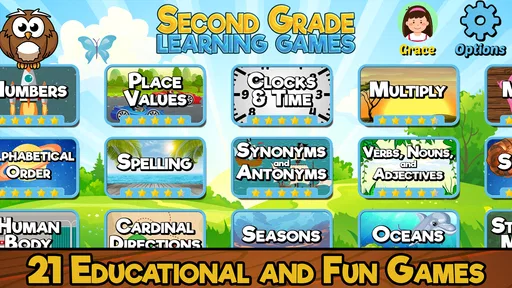
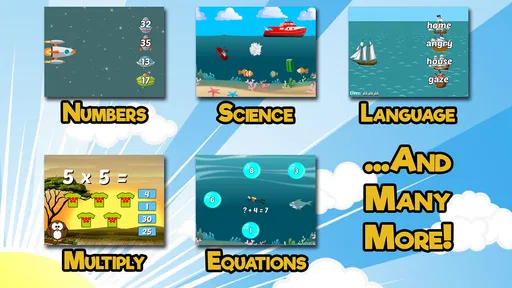
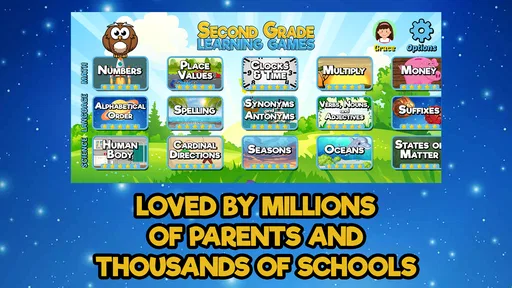
First up, let's talk about variety. The app offers a delightful mix of games that cover a range of subjects from math and science to language arts. It's like having a mini classroom right in your pocket. The developers have done a fantastic job of integrating learning into play, ensuring kids are having a blast while picking up new skills.
The interface is super kid-friendly, with bright colors and intuitive navigation that even the youngest users can master. Your child won’t need much guidance once they dive in, which is a huge win for busy parents. Plus, the characters and animations are charming, making the learning experience feel more like a game than a lesson.
Educational Content Packed With Fun
Now, onto the meat of it all—the educational content. The Second Grade Learning Games app offers a well-rounded curriculum that aligns with standard second-grade learning objectives. Here’s a quick rundown of what your child can expect:
- Math Games: From basic addition and subtraction to more complex concepts like fractions and time, the app covers it all. The puzzles are cleverly designed to reinforce math skills without feeling repetitive.
- Language Arts: Spelling, grammar, and reading comprehension are tackled in engaging ways. Your child can build sentences, learn new vocabulary, and improve their reading skills through interactive stories.
- Science and Social Studies: These sections introduce basic concepts in a fun and digestible manner, encouraging curiosity about the world around them.
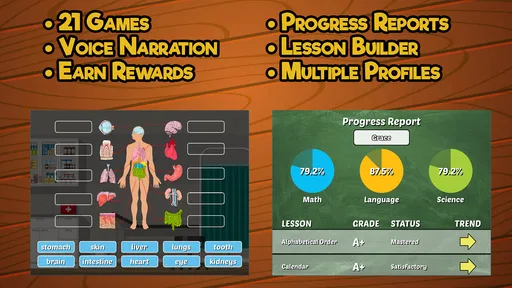
Each game offers immediate feedback, which is crucial for helping kids understand their mistakes and learn from them. And let’s not forget the rewards system—kids earn stars and badges as they progress, which adds a motivational boost to keep them coming back for more.
User Experience and Parental Controls
One aspect I particularly appreciate about this app is its focus on a safe and controlled environment. As a parent, you’ll be pleased to know that there are no ads popping up to distract your child. Plus, the app includes parental controls, allowing you to monitor progress and tailor the difficulty level to suit your child’s needs.
The app runs smoothly on both Android and iOS, with no noticeable lag or crashes during my testing. This reliability is crucial when it comes to maintaining a child’s interest and keeping frustration at bay.
Final Thoughts
In conclusion, Second Grade Learning Games is a stellar educational tool that strikes a perfect balance between learning and fun. It’s a wonderful supplement to your child’s education, offering a variety of subjects in an engaging format that keeps young learners hooked. Whether they're mastering math or exploring new vocabulary, your child is sure to benefit from the interactive experiences this app provides.
So, if you're ready to turn screen time into learning time, give Second Grade Learning Games a try. Your little one's educational journey just got a whole lot more exciting!
For families deciding whether to try it, the key question is what kind of help the child needs. If they are broadly comfortable with schoolwork but resist another worksheet, a game format can make a short review feel less formal. If they need an adult to model a new idea, or need repeated practice on one narrowly defined skill, a workbook, teacher-selected resource, or direct conversation may be more effective. I see this as a flexible supplement, not a substitute for those options.
A routine that keeps play purposeful
One useful approach is to let the child choose a subject, then ask them to describe what they are practicing before starting. At the end, ask for one example of something they learned or found tricky. This is more revealing than judging a session by how long the child played: it connects the activity to real understanding and helps you decide what to revisit next time.
For instance, on a busy afternoon while dinner is being prepared, a child could use a brief session to revisit a spelling or math topic already covered at school. Afterwards, you can ask them to explain one answer at the table or work through a similar example on paper. If they cannot explain it yet, that is a prompt for help rather than a reason to keep repeating the game.
There is a trade-off in the app’s breadth. Having several subjects in one place is convenient for a child who likes variety, but a broad collection can make it less straightforward for a parent to follow a particular school unit in sequence. I would use the game to reinforce a topic the child recognizes, then rely on class materials or an adult’s explanation when the goal is to introduce a new concept carefully.
Making the choice fit your child
The game is likely to suit families looking for approachable, low-pressure practice across more than one subject, especially when a child enjoys colorful, interactive activities. It may be less suitable for children who need a quiet, distraction-free format, or for a learner who becomes frustrated when instructions are not explained in person. In those cases, a printed exercise or adult-guided lesson can offer more room to slow down and ask questions.
Before a child starts independently, I’d explore the navigation together and agree on which areas are appropriate for them to open. That small orientation can prevent aimless switching and lets you notice whether the activities match their current confidence. If they keep returning to the same game, you can use that preference as a starting point while gently encouraging a different subject on another day.
My practical verdict is that this is most valuable as an easy-to-reach change of pace, not as a promise that every second-grade lesson will click on its own. Used in short, supported sessions, it can make review more inviting and give parents a useful opening for conversation. If your child needs a precise curriculum sequence or substantial one-to-one teaching, choose a more focused resource; if you want a playful way to revisit a range of school skills, this is a reasonable option to try.
Verdict
Strengths of Second Grade Learning Games
- Engaging educational content for kids.
- Colorful graphics enhance learning.
- Variety of subjects keeps interest.
- Adaptive difficulty for personalized learning.
- Interactive rewards motivate progress.
Limitations of Second Grade Learning Games
- Some ads can be distracting.
- Limited offline mode functionality.
- Occasional in-app purchase prompts.
- Not all content is free to access.
- Requires regular updates for new content.
Other Releases by RosiMosi LLC
View All
Barnyard Games For Kids
Educational4.1

Third Grade Learning Games
Educational3.9

First Grade Learning Games
Educational4.1

Preschool & Kindergarten Games
Educational4.2
Similar Picks in This Category
View All
Little Panda Policeman
BabyBus4.0

Monster Trucks Game for Kids 2
Raz Games4.1

Little Panda's Chinese Recipes
BabyBus4.4

Little Panda's Restaurant
BabyBus4.4

Little Panda's Ice Cream Games
BabyBus4.3

Baby Panda Care
BabyBus3.8
Frequently Asked Questions
What subjects are covered in Second Grade Learning Games?
Second Grade Learning Games offers a comprehensive range of subjects designed for second graders, including math, reading, spelling, and science. The app focuses on foundational skills like addition and subtraction, phonics, vocabulary development, and basic science concepts. This multi-subject approach ensures children get a well-rounded educational experience.
Is Second Grade Learning Games suitable for different learning styles?
Yes, Second Grade Learning Games is designed to cater to a variety of learning styles. It includes visual, auditory, and kinesthetic activities to engage children effectively. With interactive games, quizzes, and challenges, the app provides diverse methods to keep learners motivated and help them grasp concepts in a way that suits them best.
Does the app require an internet connection to function?
Second Grade Learning Games can be used both online and offline, making it convenient for learning on the go. While some features may require an internet connection, such as updates or downloading additional content, the core educational activities are accessible without internet, providing flexibility for uninterrupted learning.
How does Second Grade Learning Games track a child's progress?
The app includes a progress tracking feature that records a child’s achievements and areas needing improvement. Parents and guardians can review detailed reports and statistics that highlight a child's strengths and weaknesses. This allows for personalized learning plans and helps identify where additional support might be needed.
Are there any in-app purchases or ads in Second Grade Learning Games?
Second Grade Learning Games offers a free version with basic content, but it may include ads. For an ad-free experience and access to premium content, users can opt for in-app purchases. This ensures that children can enjoy an uninterrupted learning environment while accessing additional educational materials and activities.
Play our best games!


